Belkin smart crockpot

belkin crockpotThe best thing about crock pots is how incredibly dumb they are.  The best, most basic slow cookers just have three settings – off, low, and high.  Set it and come back later when your meal is done.  Given how great those simple ones work, I’m really questioning the logic behind Belkin’s WoMo Smart Slow Cooker.  You can use your smartphone to change the temperature, but really, this is a strange product to add any sort of connectivity to.   I use a crock pot all the time…and just can’t see how this is worth $99, not when you can get a barebones (yet incredibly effective) crock pot for $20 from Amazon.

Kolibree smart toothbrush

Kolibree toothbrushOk, so you know the ‘internet of things’ has truly arrived when someone starts bringing activity tracking to toothbrushes!  That’s exactly what Kolibree has done with their connected toothbrush.  It’ll analyze your brushing habits and display the information on your smartphone (naturally).  I’m a bit skeptical…but it does say it can help track the zones you’re brushing in, which can be nice for those of us who tend to neglect some of the harder to reach areas.  It’s expected to be launched this summer via Kickstarter, with prices ranging from $100-200 depending on the model.

New activity trackers unveiled at CES

Garmin-vivofit-820x420As expected, CES saw a bunch of new activity trackers announced, all of which should be for sale later this spring.  First up is the Garmin Vivofit, pictured here, offering a curved always-on display and the usual step and sleep tracking functions.  One different feature is adaptive goals, where once you hit a milestone, the goal for the next day is adjusted upwards to keep pushing you.  Nice idea, but not so good for someone like me who runs five days a week and wants some rest days in between.  I also don’t like the fact that it doesn’t have a rechargeable battery.   While the disposable batteries are said to last around a year, it’s still wasteful.

wellograph-ledeNext up is the Wellograph, watch-like activity tracker that also includes a heartrate monitor.  Unlike the Withings Pulse‘s heartrate monitor though, it appears this can monitor that data closer to real-time.  It’s pricey at around $300 but does offer features in a form factor that’s different than the usual bracelet styles.

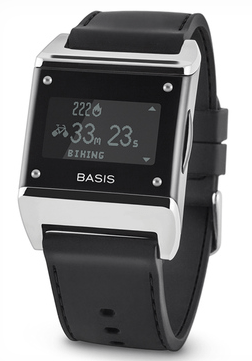
basis_b1Similar to the Wellograph, though, is the Basis B1, shown here, that monitors heartrate but also attempts to identify phases of sleep (light, deep, REM).  It’s cheaper too ($200) and in my opinion, looks nicer.


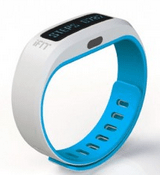
ifitiFit showed off it’s iFit Active band (also available in clip-on form, see link above), which promises to work with internet connected gym fitness equipment to help you track those activities.  Of course, it also tracks steps and sleep, syncing the data to your smartphone.

LG’s Lifeband Touch is another me-too product, tracking activity etc in a bracelet-like form factor looking a lot like the Nike Fuelband.

motherLast up is Mother from Sen.se…a product that bridges the connected self with the connected home.  A central base station communicates with ‘cookies’ that detect location, movement, and temperature.  In a sense, it’s like the activity trackers, in that each cookie can track steps taken and sleep, but it seems like there’s a lot of potential on the software side of things when a whole family of activity trackers is communicating with a central base station.  When that base station can be programmed to send notifications or other actions based upon events, it could get interesting.  What’s not clear to me is how useful the cookies would be if scattered throughout the house in stationary locations…there’s potentially a lot of data that could be collected this way.  Imagine for example, if ‘Mother’ knows there is a person nearby a stationary cookie…and can see that cookie is reporting a low temperature…can it be programmed to interface with a Nest thermostat to turn up the heat in the house?  Or if all the ‘person’ cookies are on one floor, turn down the heat to the other floors?  Since cookies can communicate with other cookies, it does raise the potential of a very smart house…but this is heavily software-dependent so is theoretically possible, but also very easy to make it complicated and of limited use.  Looks really promising though.

Archos jumps into the connected device market in a big way

archos-smartwatch-press-leadArchos unveiled a slew of new connected products in advance of CES, targeting two main areas.  The first is an array of products that’s very similar to Withings to help you track your personal fitness – a wrist-mounted activity tracker, a blood pressure monitor, and a wifi-enabled scale, everything syncing to a smartphone app.  The second set of products falls into the connected home category – a weather station and wifi camera, and a tablet computer to help join it all together.

There’s one more bit of technology though that kinda bridges these two…a smartwatch!  Well, more than one smartwatch, actually, with the cheapest priced at $50.

This market is becoming rapidly crowded…and I expect that 2014 will see this market explode, especially if Apple jumps in as expected.  Start saving your pennies now, it’s going to be an expensive year for gadget lovers!

Look for more details on these products from Archos (and probably a dozen other competitors) once CES opens on January 7th.

Reading novels may boost brain function

A study by Emory University suggests that reading a good fiction book may boost brain function for days, even after finishing the book.  It seems that reading triggers a part of the brain that basically tricks it into thinking it’s doing something it’s not…in this case, actively participating in the story.  It’s not clear what a boost in this area of the brain actually accomplishes for you, but hey, it’s cool science nonetheless.  Read more about the study here.

Review: Withings Pulse activity tracker

withings_pulseThe Withings Pulse activity tracker is one of many similar products in an emerging market of lifestyle technologies, and one that I’ve been using for many months now.  The Pulse can track how many steps you take, and how much sleep you get, but what I feel sets it apart from other products is its built in heart rate sensor located on the back.  More on that later.

The Pulse is very well designed.  Its compact size is covered in soft-touch paint, and the easy to read display blends in with the enclosure to result in no visible bezel.  Charging is via the included USB cable, and I find the Pulse needs to be charged so infrequently I really don’t know how long a charge lasts (Withings claims a two week battery life, which I see no reason to doubt).  I love the compact size that fits easily into my jeans pockets, though I’m less happy about the included wristband that you use at night.  It closes with velcro and there are times at night when I wake up and notice it’s loose or coming detached, requiring a bit of fumbling in the dark to resecure it.  I find it’s best to start out with a pretty snug closure of that wrist strap, it’s less likely to work loose that way.  The Pulse syncs automatically with my iPhone, and while it occasionally prompts me to restart the iPhone app, I find the overall sync experience to be seamless and effortless.  The display acts as a simple touch screen, with the sole physical button being used to cycle between display modes.  For example, to activate sleep mode, you cycle to the appropriate screen, then swipe to activate.  It’s all very easy to use and intuitive.

Step tracking is one of the big reasons people buy this, trying to hit a 10,000 daily step goal which is loosely based on the Surgeon General’s recommendation of 30 minutes of activity per day.  It seems to work well at this, though I find the mileage calculation to be inaccurate and overly optimistic.  When you use the free iPhone app, you can view your step activity on a daily or weekly basis.  The weekly view just shows number of steps, while the daily view color-codes the activity to represent the level of exertion – in the screenshots below, red was a nine mile jog I enjoyed yesterday (yes, enjoyed!).


activity - weekactivity - day

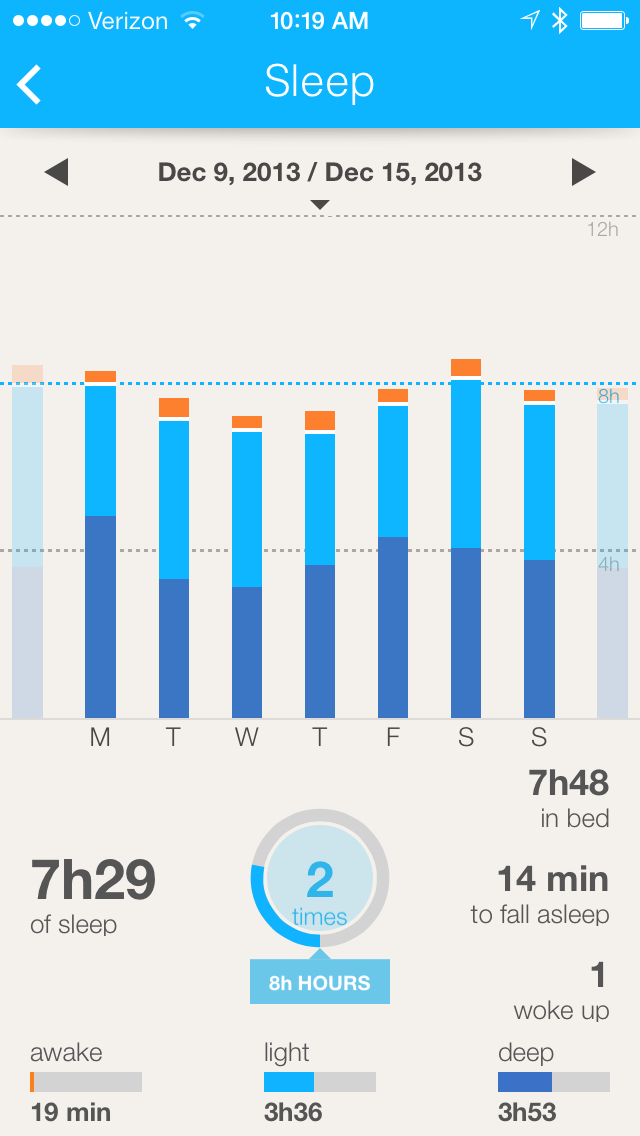
Sleep tracking is the other cool feature of the Pulse.  The other activity trackers I’ve seen will tell you the amount of time you spend in bed, but to me that’s not nearly as useful as the quality of sleep you get during that time.  The Pulse tracks light and deep sleep, which I assume it’s using the heart rate sensor to help detect (the wrist band has a window to provide a clear sight between the heart rate sensor and your skin).  It also detects time spent awake, though I find that’s not very precise.  As with activity tracking, sleep tracking data is displayed as either weekly summary, or daily view, as you can see in the screenshots below.  What I find really interesting is how sometimes the amount of deep sleep I get is not very dependent on how much time I spent in bed.

 sleep - weeksleep - day
The sleep tracking is really cool to review, especially when you start looking for correlations between how much deep sleep you get, and how you feel the next day.  It’s probably my favorite feature of the Pulse, and what really sets it apart from the other fitness trackers I’ve seen.


The iPhone app will also show data for heart rate measurements, though that isn’t of as much interest to me.  But hey, if that’s your cup of tea, this product also works great for that!  You place your finger on the rear of the Pulse and select the heart rate option on the screen to perform a quick measurement.

The Pulse can be purchased for $100 from Amazon and is well worth the money, provided you pair it with the iPhone or Android App to get the most out of the data.  I have concerns about the longevity of that velcro wrist strap (I worry the velcro will not hold as tightly over time), but this is such a fast-evolving technology that I expect I’ll be replacing my Pulse with a next generation product before that becomes a real issue.

The never-ending NSA scandal

300px-Ingsoc_logo_from_1984.svgThanks to Edward Snowden, the NSA revelations keep hitting us…and it’s like some Hollywood movie plot.  The latest have been that the RSA installed backdoors into its encryption software for the NSA, and now comes word that the NSA sometimes intercepts shipments of new laptop computers to install spyware on them.  I do wonder if all these revelations are true or not, but the reality is that enough of them seem to be true, that the one truth is we cannot trust the NSA to be honest with us.  That, and US laws that restrict people from discussing these issues, mean the truth is difficult, or even impossible to discern.  For a supposedly free society, that’s a big concern.

Play old console games in your browser!

bezerkPut aside any thoughts of working next week…thanks to the Internet Archive, you can play most of your favorite old console video games for free right from your browser!  My favorites are the Atari 2600 ones, but you’ll also find Atari 7800 games, ColecoVision, Magnavox Odyssey, and Astrocade games.  Game quality is just as you remember (for better or worse 😉 ), though in my browser at least, none of the games had sound.  It’s a nice, easy to use alternative to MAME and worth checking out here.

Google’s tracking you

Do you own an Android smarphone?  Chances are, you opted in to passing along location data to Google when you set up the phone…but did you have any idea just how extensive that is?  Google’s doing their part to be a bit more transparent here, giving you the ability to view all the location data they have on you.  Just go to the location history browser.  I wasn’t able to use this as I’ve always been an iPhone user, but this article at TechCrunch sheds some light on the level of detail involved.

There’s no reason to believe that Apple isn’t collecting a similar dataset on its users.  There are plenty of beneficial reasons for doing so, but any user of technology needs to be aware of stuff like this..if it bothers you, you can usually opt out.

MetaPro AR glasses

metapro_1-580x322Shipping next June, the MetaPro glasses offer a significantly more immersive experience than Google Glass, but at a much higher cost…$3,000.   You’ll wear a small computer to wirelessly communicate with the glasses, which can display full 720p HD in a 40 degree field of view.  Potential applications for this all come down to software, which is a bit of a chicken and egg scenario.  Nevertheless, with more products like this emerging onto the markets, I expect the software side of things to pick up pace in 2014.  Meta claims their app store has 500+ apps, which is a great start even if you’re pessimistic and expect most of those to be junk.

The one drawback?  It has built in cameras.  I think people are still going to be uncomfortable around others who are wearing glasses that may or may not be recording everything you say.

Read more over at SlashGear or check out Meta’s homepage to preorder.

Proudly powered by WordPress | Theme: Baskerville 2 by Anders Noren.

Up ↑